
The Skyroo casino withdrawal side runs entirely in AUD, which spares Australian punters the conversion nonsense that comes with euro-denominated platforms. The cashier carries local bank rails alongside cards, mobile wallets, e-wallets and four crypto networks, so there's a route out whichever way you funded the account.
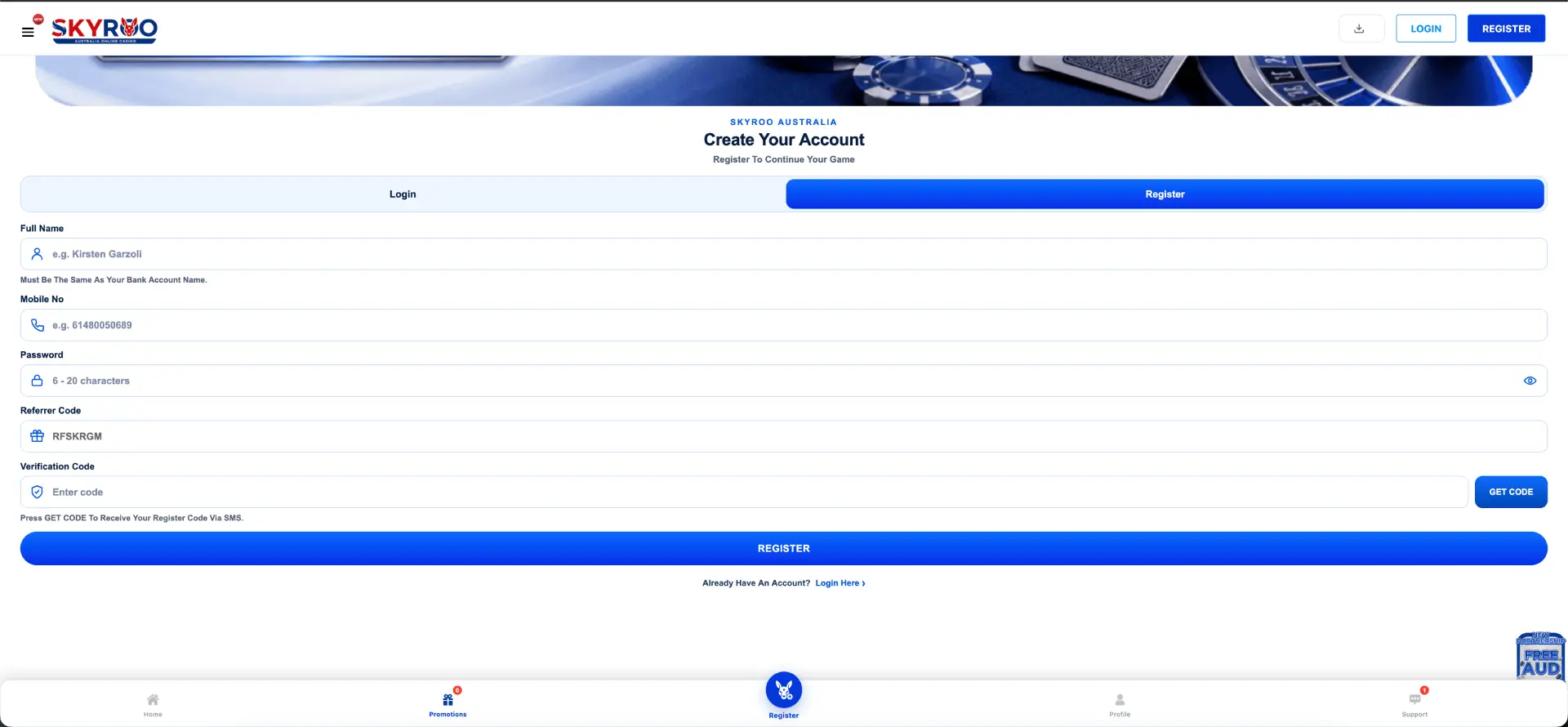
During testing of the cashier at Skyroo and the public-facing pages, one thing stood out early: the registration form states plainly that your full name must match your bank account name. That's a payout rule dressed up as a signup field, and it's the single most common reason withdrawals stall on platforms built this way. This guide covers the payout steps, the methods on offer, what verification asks for, and the caps that apply to bonus-derived balances.
How to make a withdrawal at Skyroo casino
- Log in at skyrooauss.com with your mobile number and password.
- Open your Profile from the bottom navigation bar and go to the cashier.
- Select Withdraw rather than Deposit.
- Pick your payout method - PayID, bank transfer, e-wallet or crypto.
- Enter the amount, staying inside the minimum and maximum shown in the cashier for that method.
- Confirm the receiving details, making sure the account name matches the name on your Skyroo platform profile.
- Submit the request and complete any verification prompt, then track the status in your transaction history.
If a bonus is still active on the balance, clear the turnover first. Requesting a payout mid-wagering is a quick way to have the whole thing knocked back.
Withdrawal and deposit methods
The payment row on the site covers the following. Per-method minimums, maximums and any deposit-only restrictions are shown inside the cashier once you're logged in, and those figures aren't published on the public pages - so check them there rather than taking a number off a comparison site.
| Method | Type | Notes |
|---|---|---|
| PayID | Local bank rail | Clears through your own bank app - the standout for Australian punters |
| Bank transfer | Local bank rail | Standard bank timing applies |
| Visa | Card | Confirm in the cashier whether payouts run back to card |
| Mastercard | Card | Confirm in the cashier whether payouts run back to card |
| Apple Pay | Mobile wallet | Commonly a deposit-side rail - check the withdraw tab |
| Google Pay | Mobile wallet | Commonly a deposit-side rail - check the withdraw tab |
| Neteller | E-wallet | Availability for payouts shown in the cashier |
| Skrill | E-wallet | Availability for payouts shown in the cashier |
| Ethereum | Crypto | Network fees apply on top of any platform limits |
| TRON | Crypto | Typically the cheapest network of the four on fees |
| BNB | Crypto | Confirm the exact network before sending |
| Polygon | Crypto | Confirm the exact network before sending |
Worth flagging: mobile wallets like Apple Pay and Google Pay are deposit rails on most platforms and rarely support payouts, so don't assume the way money went in is the way it comes out. Open the Withdraw tab and see which methods actually appear there before you fund an account expecting a matching exit.
Processing times
- Crypto (TRON, Ethereum, BNB, Polygon): usually the quickest once approved - network confirmation rather than banking hours.
- PayID: built for near-instant bank-to-bank movement on the Australian side, though operator approval still comes first.
- E-wallets: generally same-day once released.
- Bank transfer: subject to business days and cut-off times, so a Friday arvo request often lands the following week.
- Cards: the slowest of the lot where supported, running on card-scheme timing.
Every one of these sits behind the operator's own approval step, and stated per-method times appear in the cashier. The live transaction feed on the homepage gives a rough real-world read - during our session it was showing withdrawals from AUD 60.15 up to AUD 700 ticking through against JILI and GAMZIX.
Caps on bonus-derived balances
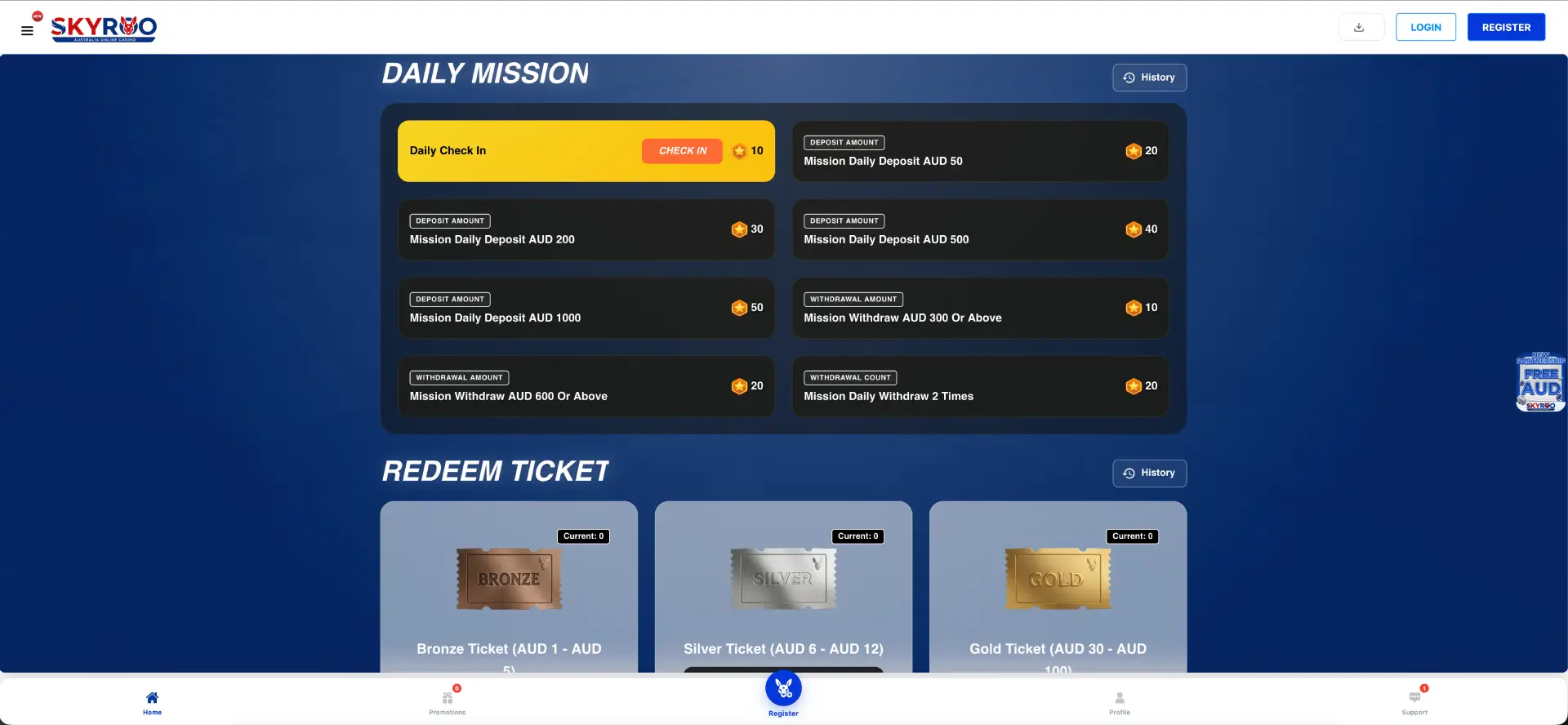
One set of limits is published outright. Rewards claimed through the Mission Hub carry:
- A $50 minimum withdrawal.
- A $500 maximum withdrawal.
- Winover X3 to clear before any payout.
- Slot games only while the credit is in play, with no feature buys and no saved free spins.
Those caps apply to Mission Reward credit specifically rather than to your own deposited funds, and general cashier limits are separate. Read the promo card before you claim, not after you've built a balance you can't fully take out.
Account verification (KYC)
Verification usually gets triggered by a first withdrawal request, a change of payout method, or a payout that's larger than your usual pattern. Get the documents ready before you need them:
- Photo ID - Australian driver licence or passport, all four corners visible, no glare.
- Proof of address - utility bill or bank statement issued within the last three months, name and address readable.
- Proof of payment method - in your own name, matching the account profile. For cards, the standard is a photo with the middle digits and CVV covered.
The name-match rule is the one to respect. The registration form spells it out, so a payout to an account in a partner's or parent's name won't get through - that's not the platform being difficult, it's a standard anti-fraud control across the industry.
Common reasons a withdrawal gets held up
- Name mismatch between the account profile and the receiving bank account.
- Unfinished wagering - an active bonus or an uncleared Winover X3 on Mission Reward credit.
- Documents rejected for glare, cropped corners or an address proof older than three months.
- Wrong crypto network - sending to the right address on the wrong chain is unrecoverable, so confirm before you submit.
- Duplicate accounts - the Mission Hub terms state duplicate account usage and system abuse can forfeit rewards.
- Method mismatch - trying to cash out to a rail that only handles deposits.
- Weekend and public holiday timing on bank transfers.
Practical tips
- Verify your account before your first big win rather than during it - nothing worse than uploading documents while you're waiting on a payout.
- Do a small test withdrawal on a new method before committing to a larger one.
- Use PayID if you're after speed on the local side; it moves without card details changing hands.
- For crypto, check the network fee against your payout - a small amount on the wrong chain can lose real value to fees.
- Screenshot your withdrawal confirmation and reference number.
- Two withdrawals in a day pays 20 Mission points, and single withdrawals of AUD 300 or AUD 600 and above pay 10 and 20 - so the Mission Hub rewards cashing out, which is a rarity.
Withdrawal security
Access to your account - and therefore to your payout details - sits behind your mobile number and password, with SMS used for recovery. Lock your handset, use a password you don't use anywhere else, and don't tick Keep Me Logged In on a shared device. Support will never ask for your password; anyone who does is having a lend of you.
Mobile withdrawals
The full cashier runs on mobile, so requests, verification uploads and transaction history are all reachable from the Profile tab in the bottom navigation bar. Photographing your ID with the same phone you're withdrawing from is the quickest way through the document step - no emailing files to yourself.
FAQ about Skyroo platform withdrawals
What's the minimum withdrawal at Skyroo platform?
General per-method minimums are shown in the cashier after login. For rewards claimed through the Mission Hub, the stated minimum is $50 and the maximum is $500.
Can I withdraw with PayID?
PayID appears in the platform's payment row alongside bank transfer, cards, mobile wallets, e-wallets and crypto. Open the Withdraw tab in the cashier to confirm which of those are on the payout side.
Why does my name have to match my bank account?
The registration form requires it, and payouts are checked against it. It's a standard control to confirm the person withdrawing owns the receiving account.
How long does a Skyroo platform withdrawal take?
It depends on the rail - crypto is usually quickest, bank transfers run on business days. Every request goes through an approval step first, and stated times appear in the cashier.
Do I have to verify my identity?
Expect to at the first withdrawal or when payout details change. Have photo ID, a recent proof of address and proof of the payment method ready.
Can I withdraw bonus money straight away?
No. Mission Reward credit carries a Winover X3 before payout, and other offers show their own conditions inside the promo card.
Does withdrawing earn me anything?
Yes - the Mission Hub pays 10 points for a withdrawal of AUD 300 or above, 20 points for AUD 600 or above and 20 points for two withdrawals in a day.
18+. Gambling can be addictive - play responsibly and set a limit before you start. Free support is available in Australia through Gambling Help Online on 1800 858 858.